

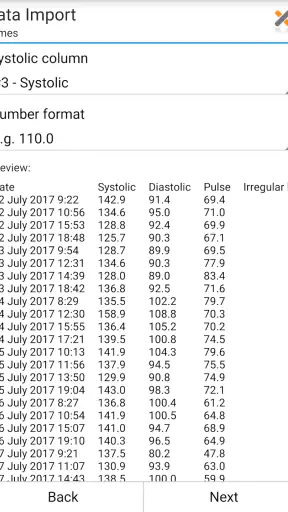
Managing blood-pressure readings is one of those jobs that sounds simple until you need a clear record for yourself or a medical appointment. Blood Pressure Log - MyDiary is a medical app from Blip Software LTD that focuses on recording, reviewing, and sharing those readings rather than trying to replace a clinician. I found its value less in dramatic presentation and more in giving repeated measurements a consistent home.
The app is free to start, suitable for Everyone, and has become a well-established choice in its category, with an average rating of 4.5 from around 14 thousand ratings and over 1 million installs. That level of adoption makes sense for a straightforward health log, although the experience still depends heavily on how carefully you take each reading before entering it.
Where the experience usually gets stuck
The first thing I would clarify is what this app can and cannot do. It can help you record blood-pressure information, look for patterns, and share a clearer history. It does not take the measurement for you, correct a poorly used cuff, or decide whether a reading is medically urgent. If a number looks alarming or you feel unwell, the app should not delay contacting an appropriate healthcare professional.
That distinction matters because a log can make an inaccurate routine look very convincing. If I measure immediately after climbing stairs, then enter the result without noting the circumstances, the chart may show a change that reflects the moment rather than my usual blood pressure. The app is most useful when I treat it as a record of a careful routine, not as a diagnostic device.
Another common point of friction is expecting the first entry to explain everything. A single reading rarely gives useful context. The practical benefit appears after I use the same general method over time, at comparable moments, and keep the entries complete enough to discuss later. The interface can organize information, but it cannot create a meaningful trend from inconsistent input.
I also would not choose this app if I wanted a full medical record covering every possible symptom, medication detail, appointment, or laboratory result. Its identity is narrower: it is a blood-pressure diary with analysis and sharing tools. That focus is a strength for someone who wants less clutter, but a limitation for anyone seeking an all-purpose health-management system.
Why the simple approach can be useful
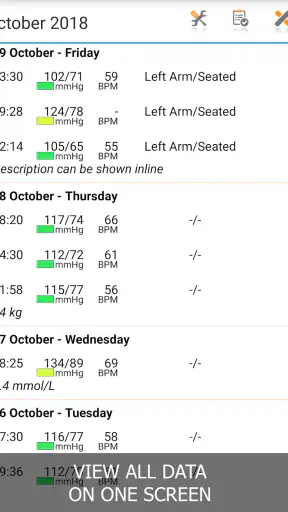
Many people begin with notes on a phone or scraps of paper. That works until entries become difficult to compare, dates are unclear, or a clinician has to interpret a long unstructured list. A dedicated log gives the information a more usable shape. In my experience, the biggest improvement comes from reducing the small decisions around each entry: where to put it, how to find older readings, and how to prepare a summary when needed.
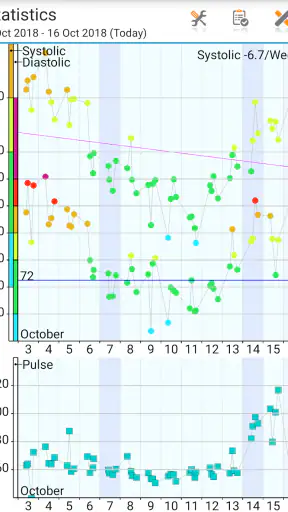
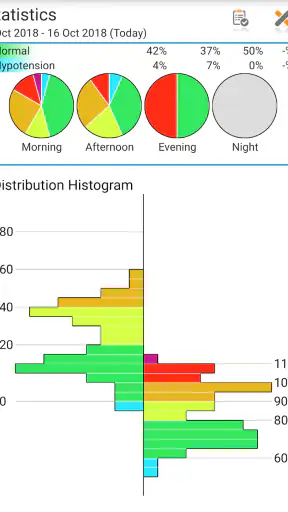
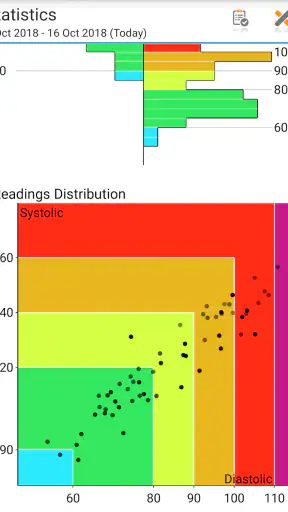
The app’s store summary highlights tracking, analysis, and sharing, and those three jobs fit together naturally. Recording is the foundation, analysis helps reveal changes across entries, and sharing turns a private diary into something that can support a conversation with a professional. None of those steps is impressive in isolation, but together they are more practical than relying on memory.
Setup checks that prevent avoidable problems
Before blaming the app for missing or confusing information, I would start with the basics. The current version is 1.8.b53 and requires Android 6.0 or later. That makes the first check simple: confirm that the phone meets the minimum operating-system requirement and that the app is installed from a trustworthy source. Older devices can also create general reliability issues if storage is nearly full or the operating system is no longer behaving normally.
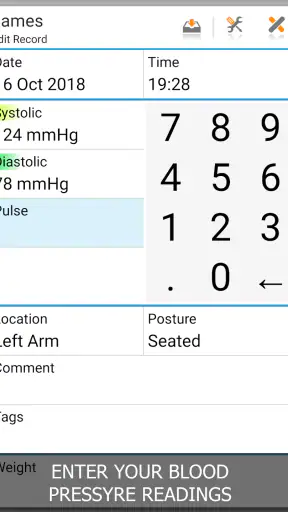
After installation, I would make one test entry while sitting somewhere calm. This is not about creating a medically meaningful result; it is about learning the entry flow. I would check that the date and time look right, that the values are entered in the intended fields, and that the saved record can be found again. Doing this before a week of readings prevents a small misunderstanding from affecting an entire history.
A useful habit is to decide on a naming and timing routine before using the analysis tools. For example, I might measure at a consistent part of the day and enter the result immediately rather than collecting several readings in my memory. If my routine changes, I should recognize that the comparison may also change. The app can display the records, but it cannot know whether one was taken after exercise, during stress, or under different conditions unless I record that context where the app allows it.
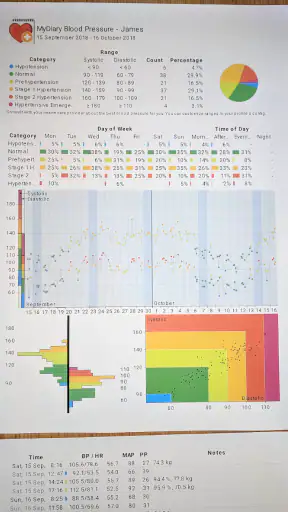
When sharing is important, I would test that process early instead of waiting for an appointment. The purpose is not merely to prove that a report can be produced; it is to see whether the resulting information is understandable to the person who will receive it. If the history is too broad, too sparse, or missing the period that matters, I can adjust my routine before I actually need it.
There is also a financial detail worth keeping in mind. The app is free, while in-app purchases are listed at $4.00 per item. I would therefore explore the basic workflow first and only consider an optional purchase if it solves a specific problem for me. A free starting point is helpful, but I would not assume that every advanced convenience is included without checking the purchase screen on the device.
Making the first week more useful
My preferred approach would be to keep the first several entries deliberately boring. I would use the same cuff, the same general sitting position, and enough rest before measuring. I would then enter the result directly into the diary. This creates a cleaner baseline than mixing rushed readings with carefully prepared ones and trying to interpret them together later.
One non-obvious advantage of this approach is that it separates app problems from measurement problems. If the entry saves correctly but the numbers vary widely, that does not automatically indicate a software fault. Conversely, if the values are correct on the measuring device but appear in the wrong fields, the issue is likely in data entry or interpretation. Testing one complete cycle makes that distinction easier.
I would also avoid editing old entries casually. If I discover a typo, correcting it is sensible, but changing a value because it looks unusual can destroy the very pattern I am trying to understand. A surprising result should first be treated as information to verify, not as an error simply because it does not fit earlier readings.
Recovering when the workflow breaks
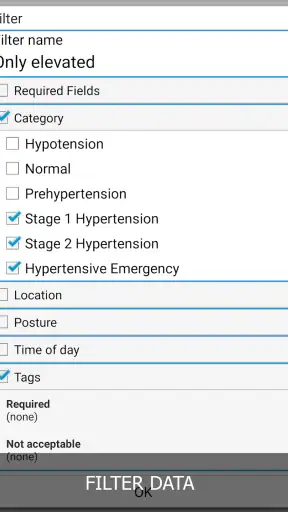
If an entry seems to disappear, I would first search the diary carefully rather than immediately reinstalling the app. Check whether the date or time was changed, whether the record was saved after entering all values, and whether I am looking at a filtered or analyzed view rather than the complete history. Small navigation mistakes can look like lost data.
If the app behaves strangely, the safest general troubleshooting sequence is modest: close and reopen it, restart the phone, check available storage, and make a new test entry. I would avoid deleting the app or clearing its data until I had considered whether the existing history is backed up or otherwise recoverable. A health diary is not the place for aggressive troubleshooting that may erase the very records I need.
When sharing does not work as expected, I would narrow the problem. First, confirm that the history itself is present and readable. Then try sharing a smaller period or a fresh test record if the app offers that choice. If the issue appears only with one recipient or one phone application, the problem may belong to the receiving side rather than the diary. Keeping a simple local note of the relevant dates can help while sorting that out, but I would not treat a temporary workaround as a replacement for the actual record.
A practical recovery trick is to establish a short checkpoint routine. After entering a reading, I would reopen the relevant history and confirm that it appears where expected. This takes little time and catches mistakes while the measurement is still fresh. It is especially useful for people who enter readings quickly between other tasks, when it is easy to tap through a screen without noticing a field or save action.
I would not create duplicate entries just because the first one is hard to find. Duplicates can make later analysis look busier than the real measurement history. Instead, I would inspect the date, time, and surrounding records, then add only one corrected entry if I am sure the original was wrong. A clean timeline is more valuable than a crowded one.
When the app is not the cause
Blood-pressure readings can change for many ordinary reasons, including rest, activity, anxiety, caffeine, illness, and the way the cuff is positioned. That means a chart may accurately reflect variation without identifying its cause. I appreciate the app more when I use its analysis as a prompt for better questions, not as an answer by itself.
For example, if my morning entries are repeatedly different from my evening entries, I would review the surrounding routine before deciding that the app has found a medical explanation. Was I measuring at different times? Had I just been active? Was the cuff placed consistently? Were the readings entered correctly? Those checks are more useful than assuming that a visual trend automatically proves a diagnosis.
The measuring device matters too. If the monitor is unreliable, incorrectly sized, or used inconsistently, the diary can only preserve those errors neatly. The app is therefore best paired with a dependable monitor and instructions from a healthcare professional. I would also bring the device or its details into the conversation if a clinician wants to compare home readings with measurements taken elsewhere.
There is a safety boundary here that deserves plain language. The app should not be used to decide whether to start, stop, or change medication, and it should not replace urgent medical advice. A well-organized history can help a clinician understand what has been happening, but it does not turn the phone into a medical authority. If symptoms are severe or a reading seems dangerously abnormal, I would seek appropriate help rather than waiting for the app to interpret it.
This is also where another option may be better. Someone who wants reminders, medication schedules, symptom journaling, and appointment management in one place may prefer a broader health platform. Someone who only needs an occasional number may find a basic note sufficient. Blood Pressure Log - MyDiary makes the most sense in the middle: for a person who takes readings regularly and wants a focused record without building a larger health-management system.
Who will get the most from it
I think the app suits people who have been asked to monitor their blood pressure at home, people who want a more orderly history than handwritten notes provide, and caregivers who need to help maintain a readable record. It can also be useful before a routine appointment, provided the entries reflect a consistent method and are not presented as a substitute for professional interpretation.
A realistic everyday scenario would be a person who measures before breakfast, enters the result immediately, and repeats the process later in the day when advised to do so. After several days, the person can review the history instead of trying to remember isolated numbers. If a clinician asks what happened during a particular period, the diary is more practical than searching through messages or paper slips.
The strongest hidden benefit is not a single analysis screen. It is the discipline created by having one dedicated destination. When the process is quick enough, I am less likely to postpone entry, round numbers from memory, or lose the context of the measurement. That small reduction in friction can improve the quality of the record more than a flashy feature would.
Still, I would skip it if I disliked entering data manually, needed automatic readings from a connected monitor, or expected the app to interpret symptoms and treatment decisions. I would also look elsewhere if my main goal were a comprehensive personal health archive. Its focused design is useful only when that focus matches the job I need done.
My practical verdict
After using it as a focused diary, I see Blood Pressure Log - MyDiary as a sensible tool for turning repeated home measurements into a history that is easier to review and share. The free entry point, Everyone age rating, and support for Android 6.0 or later make it approachable for a broad range of users. Its 4.5 average from around 14 thousand ratings also suggests that the straightforward concept works for many people.
My recommendation comes with one condition: build the measurement routine first, then let the app organize it. Test a sample entry, confirm that the history is easy to locate, and try the sharing workflow before you depend on it. Keep the phone, monitor, and entry method consistent, and treat unusual results as something to verify rather than something the software should explain automatically.
Blip Software LTD has kept the product centered on a clear need, and I think that is its main appeal. It is not the right choice for every health-tracking situation, but it can be a useful companion for someone who wants a dedicated blood-pressure log with analysis and sharing in the same place. Use it as an organized record, not as a replacement for medical care, and its practical value becomes much clearer.


